






ProSolvr logo

Resolve problems, permanently

Root Cause Analysis of Security Misconfigurations

RCA of Security Misconfigurations

Security misconfiguration is one of the most common problems that weaken cybersecurity. It happens when applications, platforms, networks, or cloud systems are not set up correctly. Simple mistakes like leaving debug mode on, showing stack traces or error messages in production, running unused services, or keeping default passwords can give attackers easy access. Open ports without proper firewall protection also make systems vulnerable and can lead to data leaks or service downtime.

In cloud environments, misconfigurations can cause even bigger issues. Granting excessive IAM permissions or leaving storage buckets public can expose sensitive data to the internet. Using outdated software, missing security headers, and not following environment hardening guidelines increase the risk further. These problems often occur because of poor configuration management, manual changes, or no clear security standards. Over time, they build up and create hidden weaknesses that threaten the whole organization.

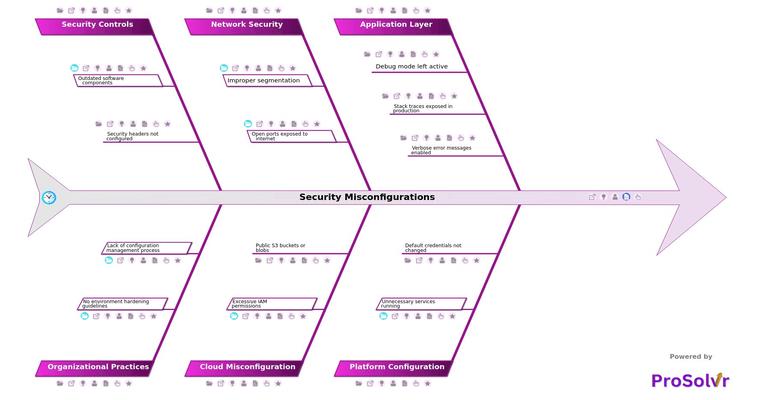
When a security incident happens, it is important to understand why it occurred. ProSolvr uses a GenAI-powered Root Cause Analysis (RCA) method based on Six Sigma principles to help teams find the real cause. By showing connections across the application, platform, network, cloud, and organizational levels through visual Fishbone diagrams, ProSolvr helps uncover how small gaps lead to bigger failures.

Through this structured RCA process, ProSolvr turns investigation results into useful insights. It helps teams plan strong Corrective and Preventive Actions, improve configuration management, and reduce future risks. With its visual and collaborative workspace, ProSolvr makes it easier for organizations to solve cybersecurity issues quickly and build lasting resilience.

Security Misconfigurations

    • Application Layer
      • Debug mode left active
      • Stack traces exposed in production
      • Verbose error messages enabled
    • Platform Configuration
      • Unnecessary services running
        • Exposes unnecessary attack surface
      • Default credentials not changed
    • Network Security
      • Improper segmentation
        • Internal services accessible externally
      • Open ports exposed to internet
        • No firewall filtering
    • Cloud Misconfiguration
      • Excessive IAM permissions
        • Roles with full admin privileges
      • Public S3 buckets or blobs
    • Security Controls
      • Outdated software components
        • Known vulnerabilities unpatched
      • Security headers not configured
    • Organizational Practices
      • No environment hardening guidelines
        • Admins unaware of baseline configurations
      • Lack of configuration management process
        • Manual and ad-hoc changes

Suggested Actions Checklist

Here are some corrective actions, preventive actions and investigative actions that organizations may find useful:

    • Application Layer
      • Debug mode left active
        • Corrective Actions:
          • Disable debug mode in all production environments immediately.
        • Preventive Actions:
          • Implement CI/CD checks to block deployments with debug mode enabled.
        • Investigative Actions:
          • Audit application environments to identify where debug mode is enabled and determine how it passed deployment checks.
      • Stack traces exposed in production
        • Corrective Actions:
          • Configure application settings to suppress stack traces in user-facing error messages.
        • Preventive Actions:
          • Enforce exception handling best practices and test error responses before deployment.
        • Investigative Actions:
          • Review error logs and monitoring tools to see how often stack traces were exposed and under what conditions.
      • Verbose error messages enabled
        • Corrective Actions:
          • Update application configuration to show generic error messages in production.
        • Preventive Actions:
          • Add security review step in the deployment pipeline to validate error message handling.
        • Investigative Actions:
          • Analyze error message logs to understand information disclosure risks.
    • Platform Configuration
      • Unnecessary services running
        • Corrective Actions:
          • Identify and disable all unused services on servers and containers.
        • Preventive Actions:
          • Use hardened OS images and automated scripts to enforce minimal service startup.
        • Investigative Actions:
          • Scan all assets to inventory active services and determine how they were enabled.
      • Default credentials not changed
        • Corrective Actions:
          • Replace all default credentials with strong, unique passwords immediately.
        • Preventive Actions:
          • Enforce a baseline security configuration policy that includes mandatory credential updates during provisioning.
        • Investigative Actions:
          • Investigate systems with unchanged credentials to assess possible unauthorized access.
    • Network Security
      • Improper segmentation
        • Corrective Actions:
          • Update network rules to isolate internal services from external access.
        • Preventive Actions:
          • Implement network zoning and micro-segmentation policies during infrastructure design.
        • Investigative Actions:
          • Perform a network traffic analysis to detect unauthorized external access to internal systems.
      • Open ports exposed to internet
        • Corrective Actions:
          • Close unnecessary ports and configure firewall rules to block public access.
        • Preventive Actions:
          • Deploy automated port scanning tools to regularly monitor and alert on exposed ports.
        • Investigative Actions:
          • Review firewall configurations and scan history to track exposure duration and potential threats.
    • Cloud Misconfiguration
      • Excessive IAM permissions
        • Corrective Actions:
          • Restrict IAM roles to follow least privilege principles.
        • Preventive Actions:
          • Implement role-based access controls (RBAC) and enforce permissions review during account provisioning.
        • Investigative Actions:
          • Audit all roles and permissions to identify over-privileged accounts and their access history.
      • Public S3 buckets or blobs
        • Corrective Actions:
          • Change permissions to make all buckets private and apply access policies.
        • Preventive Actions:
          • Use cloud security posture management (CSPM) tools to enforce public access restrictions.
        • Investigative Actions:
          • Examine access logs to identify if any sensitive data was accessed externally.
    • Security Controls
      • Outdated software components
        • Corrective Actions:
          • Patch or upgrade all outdated components immediately.
        • Preventive Actions:
          • Establish an automated vulnerability management and patching process.
        • Investigative Actions:
          • Review version control systems and dependency reports to assess the scope of outdated components.
      • Security headers not configured
        • Corrective Actions:
          • Add missing HTTP security headers (e.g., CSP, HSTS, X-Frame-Options) to server responses.
        • Preventive Actions:
          • Integrate security header validation into web application testing procedures.
        • Investigative Actions:
          • Scan existing applications to determine where headers are missing and why they weren’t implemented.
    • Organizational Practices
      • No environment hardening guidelines
        • Corrective Actions:
          • Develop and publish environment hardening standards and baseline configurations.
        • Preventive Actions:
          • Incorporate these standards into onboarding and DevOps training.
        • Investigative Actions:
          • Evaluate past incidents to identify risks introduced due to lack of hardening.
      • Lack of configuration management process
        • Corrective Actions:
          • Introduce a version-controlled, automated configuration management system (e.g., Ansible, Puppet).
        • Preventive Actions:
          • Mandate change tracking and approval workflows for all configuration changes.
        • Investigative Actions:
          • Investigate prior misconfigurations to determine the impact of ad-hoc manual changes.
 

Who can learn from the Security Misconfigurations template?

  • System Administrators: System administrators can use the RCA to identify and correct missteps, which increase the attack surface. Learning from these mistakes helps them implement standardized configuration baselines and tighten system hardening practices.
  • DevOps Teams: DevOps teams gain insights into how deployment oversights can compromise security. This understanding encourages the integration of security checks into CI/CD pipelines to prevent recurrence.
  • Cloud Engineers: Cloud engineers can learn how various issues can lead to critical vulnerabilities. The RCA helps them apply the principle of least privilege and enforce tighter access control policies in cloud environments.
  • Security Analysts: Security analysts benefit from RCA findings by identifying patterns across incidents, without proper firewall rules. This enables them to better tune detection systems and prioritize remediation efforts.
  • IT Managers: IT managers can understand how organizational gaps contribute to security failures. This empowers them to drive policy changes and invest in training or automation tools.
  • Compliance and Audit Teams: Compliance teams learn how misconfigurations can lead to regulatory risks. RCA outcomes guide them in refining audit checklists and enforcing compliance with industry standards.

Why use this template?

ProSolvr uses AI-driven Root Cause Analysis (RCA) with visual Fishbone diagrams to make the RCA process faster and more structured. By organizing causes under clear categories, ProSolvr helps teams trace problems systematically, prioritize issues, assign actions, and document CAPA measures with ease. The platform encourages continuous improvement and smarter collaboration among cybersecurity teams, helping organizations strengthen their defenses after every incident.

Use ProSolvr by smartQED to efficiently resolve security misconfigurations and improve the overall resilience of your organization

Curated from community experience and public sources:

  • https://owasp.org/Top10/A05_2021-Security_Misconfiguration/
  • https://www.balbix.com/insights/security-misconfiguration-impact-examples-and-prevention
