






ProSolvr logo

Resolve problems, permanently

Root Cause Analysis of Broken Access Control

RCA of Broken Access Control

Broken Access Control is one of the most critical vulnerabilities in modern web applications and enterprise systems. It occurs when users are able to act outside of their intended permissions, accessing or modifying data, functions, or resources that should be restricted. Common forms of this issue include missing authorization checks, insecure direct object references (IDOR), and misconfigured user roles. These lapses in access control create severe risks such as data leaks, privilege escalation, and unauthorized system manipulation. They can stem from poor development practices like lack of code reviews, absence of secure coding standards, and inadequate authentication/authorization mechanisms.

When an application exposes object identifiers in URLs without validating user permissions, it allows attackers to manipulate those identifiers and gain unauthorized access to sensitive data. Similarly, when developers assume that the user interface alone is sufficient to restrict access, they overlook the necessity of enforcing security at the server or backend level leading to major breaches.

Again, when developers are unaware of security risks due to no secure coding guidelines, or when endpoints fail to enforce user roles, systems become vulnerable. Even operational oversights like default credentials remaining unchanged or permissions set too broadly on sensitive files can expose organizations to cybersecurity incidents.

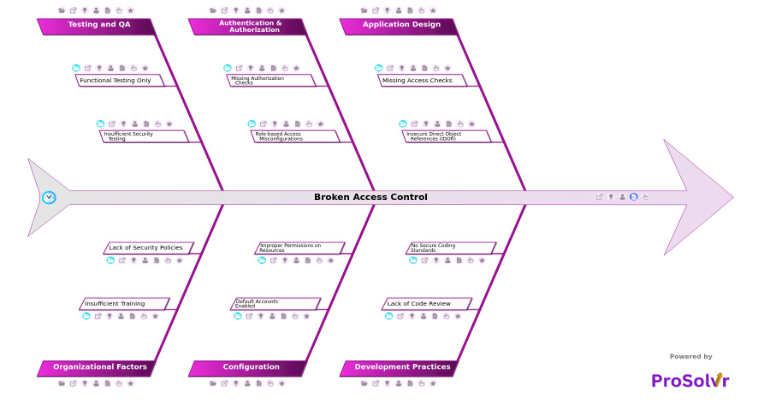
Once such an incident occurs, conducting a structured root cause analysis becomes essential not only to understand what went wrong, but also to prevent future occurrences. A GEN-AI powered root cause analysis using a fishbone diagram aligned with Six Sigma principles can greatly enhance the effectiveness of post-incident problem-solving. The fishbone diagram (also known as the Ishikawa diagram) categorizes root causes under clearly defined domains. The structured nature of this analysis enables teams to come up with Corrective and Preventive Actions (CAPA).

An application like ProSolvr, which leverages GEN-AI to create fishbone diagrams for root cause analysis, can significantly accelerate and enrich this process. By allowing users to input known causes, ProSolvr generates a structured analysis that guides teams through cause categorization and prioritization.

Broken Access Control

    • Application Design
      • Missing Access Checks
        • Assumes UI restricts access
      • Insecure Direct Object References (IDOR)
        • Object identifiers exposed in URLs
    • Development Practices
      • Lack of Code Review
        • Access control flaws not identified
      • No Secure Coding Standards
        • Developers unaware of security risks
    • Authentication & Authorization
      • Missing Authorization Checks
        • Endpoints do not enforce user roles
      • Role-based Access Misconfigurations
        • Excessive privileges granted
    • Configuration
      • Default Accounts Enabled
        • Default credentials not changed
      • Improper Permissions on Resources
        • Public access to sensitive files
    • Testing and QA
      • Functional Testing Only
        • Security not in test scope
      • Insufficient Security Testing
        • Lack of penetration testing
    • Organizational Factors
      • Insufficient Training
        • Employees unaware of access control importance
      • Lack of Security Policies
        • No standard for access control

Suggested Actions Checklist

Here are some corrective actions, preventive actions and investigative actions that organizations may find useful:

    • Application Design
      • Missing Access Checks
        • Corrective Actions:
          • Implement backend-level access control mechanisms independent of the UI.
        • Preventive Actions:
          • Incorporate mandatory backend access checks in design specifications and threat models.
        • Investigative Actions:
          • Review existing modules to identify where access checks are UI-dependent and conduct access control audits.
      • Insecure Direct Object References (IDOR)
        • Corrective Actions:
          • Implement indirect object references (e.g., tokenized or mapped IDs) and validate user access to each object.
        • Preventive Actions:
          • Mandate secure object reference handling in design standards and developer onboarding.
        • Investigative Actions:
          • Audit all endpoints for exposure of direct identifiers and map affected assets/users.
    • Development Practices
      • Lack of Code Review
        • Corrective Actions:
          • Introduce mandatory peer code reviews focusing on access control logic.
        • Preventive Actions:
          • Establish and enforce a secure code review checklist as part of the software development lifecycle (SDLC).
        • Investigative Actions:
          • Conduct a retrospective analysis of past commits to find missed access flaws.
      • No Secure Coding Standards
        • Corrective Actions:
          • Develop and distribute secure coding guidelines tailored to the tech stack.
        • Preventive Actions:
          • Make secure coding practices part of the development onboarding and performance metrics.
        • Investigative Actions:
          • Analyze recent vulnerabilities for patterns suggesting ignorance of secure practices.
    • Authentication & Authorization
      • Missing Authorization Checks
        • Corrective Actions:
          • Patch affected endpoints with proper role validation logic.
        • Preventive Actions:
          • Implement authorization middleware or access control libraries across services.
        • Investigative Actions:
          • Identify all endpoints lacking explicit authorization logic through code scanning or reviews.
      • Role-based Access Misconfigurations
        • Corrective Actions:
          • Audit and reconfigure roles and permissions to adhere to the principle of least privilege.
        • Preventive Actions:
          • Automate role assignment with pre-defined access levels and approval workflows.
        • Investigative Actions:
          • Evaluate user activity logs to detect over-privileged access patterns.
    • Configuration
      • Default Accounts Enabled
        • Corrective Actions:
          • Disable or remove unused default accounts and change default credentials immediately.
        • Preventive Actions:
          • Include a configuration hardening checklist as part of deployment pipelines.
        • Investigative Actions:
          • Scan for active default accounts and assess their usage history.
      • Improper Permissions on Resources
        • Corrective Actions:
          • Reconfigure file and resource permissions to restrict public or unauthorized access.
        • Preventive Actions:
          • Integrate permission checks in the CI/CD pipeline for deployment readiness.
        • Investigative Actions:
          • Inventory all accessible resources and verify against expected access controls.
    • Testing and QA
      • Functional Testing Only
        • Corrective Actions:
          • Expand test coverage to include access control and security scenarios.
        • Preventive Actions:
          • Integrate security testing into the definition of done (DoD) for QA processes.
        • Investigative Actions:
          • Review historical test cases and identify critical security gaps not covered.
      • Insufficient Security Testing
        • Corrective Actions:
          • Schedule and perform comprehensive penetration testing and vulnerability assessments.
        • Preventive Actions:
          • Adopt security testing tools and practices (e.g., DAST, SAST) as mandatory QA steps.
        • Investigative Actions:
          • Analyze previous releases for missed vulnerabilities and correlate with real-world incidents.
    • Organizational Factors
      • Insufficient Training
        • Corrective Actions:
          • Conduct targeted training on secure access control principles for developers and QA.
        • Preventive Actions:
          • Implement mandatory, recurring security training sessions for all technical roles.
        • Investigative Actions:
          • Assess employee awareness via surveys or interviews post-incident.
      • Lack of Security Policies
        • Corrective Actions:
          • Draft and enforce a formal access control policy with ownership and review cadence.
        • Preventive Actions:
          • Include policy adherence checks in internal audits and governance reviews.
        • Investigative Actions:
          • Benchmark current practices against industry standards to identify gaps in policy coverage.
 

Who can learn from the Broken Access Control template?

  • Developers: Developers can learn the importance of implementing secure coding practices and not relying solely on the user interface for access control. Understanding how issues arise can help them write more secure backend logic.
  • QA/Testers: Quality Assurance professionals can recognize the need to incorporate security testing into their functional test plans. By identifying gaps, they can advocate for penetration testing and security validation in the QA cycle.
  • System Administrators: System admins can understand the various kinds of risks. The RCA teaches them to review and harden configurations regularly to prevent unauthorized access.
  • Security Teams: Security analysts can use the RCA to refine threat models and improve access control policies. It also emphasizes the importance of auditing endpoints and role assignments to catch vulnerabilities.
  • Project Managers: Project managers can see how organizational gaps contribute to technical vulnerabilities. This insight can guide them to allocate resources for security training and enforce secure development standards in project planning.
  • Compliance Officers: Compliance teams can use the RCA to ensure that access control measures align with regulatory standards. Understanding failures helps them enforce least-privilege principles and better audit access control practices.

Why use this template?

ProSolvr's visual representation aids in stakeholder communication, ensuring that every identified cause leads to a documented corrective or preventive measure. This kind of AI-powered root cause application not only clarifies the pathways of failure but also helps organizations institutionalize better access control practices, ultimately reducing the risk of repeat incidents. By visually mapping out the contributing factors under each category, teams can pinpoint the exact breakdowns that led to the vulnerability.

Use ProSolvr by smartQED to effectively resolve problems in your organization.

Curated from community experience and public sources:

  • https://owasp.org/Top10/A01_2021-Broken_Access_Control/
  • https://www.brightsec.com/blog/broken-access-control-attack-examples-and-4-defensive-measures/
