






ProSolvr logo

Resolve problems, permanently

Root Cause Analysis of Remote Desktop and VPN Exploits

RCA of Remote Desktop and VPN Exploits

Remote Desktop Protocol (RDP) and Virtual Private Network (VPN) technologies are essential for remote work and secure access to corporate resources. However, their widespread use has also made them attractive targets for cybercriminals. Remote Desktop and VPN exploits typically involve unauthorized access through weak credentials, insecure configurations, exposed services, or unpatched software. Once attackers gain access, they may steal sensitive data, deploy ransomware, disrupt operations, or compromise entire systems.

Several technical weaknesses can increase the risk of Remote Desktop and VPN exploits. For example, a lack of network segmentation may allow attackers to move laterally between connected systems. Unpatched RDP or VPN software may also contain known Common Vulnerabilities and Exposures (CVEs), giving attackers established methods of entry. In addition, weak authentication controls, excessive access privileges, and internet-exposed RDP services can make remote-access environments easier to compromise.

A lack of logging and monitoring can further increase the impact of an attack. Without login-attempt monitoring, unusual location detection, account lockout controls, or alerts for repeated authentication failures, organizations may not identify unauthorized access quickly. Delayed detection and containment can lead to operational downtime, financial loss, regulatory concerns, and reputational damage. Therefore, organizations should combine secure configurations with multi-factor authentication, network segmentation, timely patching, and continuous monitoring.

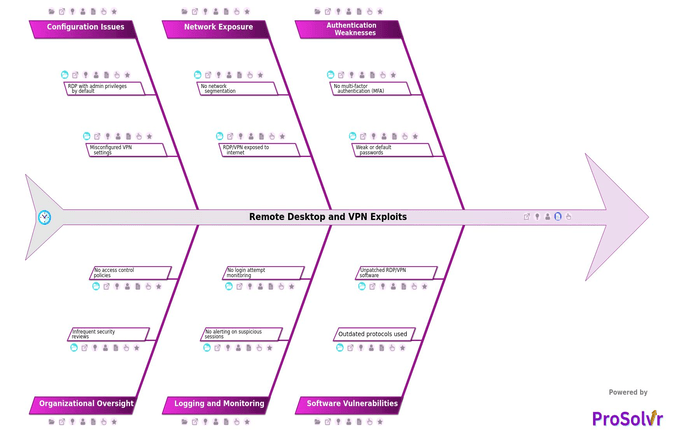
After an incident, a GenAI-powered Root Cause Analysis using a fishbone diagram and Six Sigma principles can support structured problem-solving. Instead of addressing only the immediate symptoms, teams can investigate underlying causes across configuration, authentication, software, network security, monitoring, and organizational oversight. ProSolvr uses a fishbone diagram as its central RCA framework, helping teams identify root causes and develop targeted Corrective, Preventive, and Investigative Actions. This approach can reduce recurrence and strengthen the organization’s remote-access security posture.

Remote Desktop and VPN Exploits

    • Authentication Weaknesses
      • No multi-factor authentication (MFA)
        • Credential compromise leads to full access
      • Weak or default passwords
        • No password complexity enforcement
    • Software Vulnerabilities
      • Outdated protocols used
        • Use of deprecated encryption methods
      • Unpatched RDP/VPN software
        • Known CVEs not addressed
    • Network Exposure
      • No network segmentation
        • Access to sensitive systems from flat network
      • RDP/VPN exposed to internet
        • No geo/IP restrictions applied
    • Logging and Monitoring
      • No alerting on suspicious sessions
        • Alert fatigue causing critical alerts to be ignored
      • No login attempt monitoring
        • Brute force attempts undetected
    • Configuration Issues
      • RDP with admin privileges by default
        • No principle of least privilege enforced
      • Misconfigured VPN settings
        • Split tunneling enabled unnecessarily
    • Organizational Oversight
      • Infrequent security reviews
        • RDP/VPN exposure not regularly assessed
      • No access control policies
        • Unrestricted access for remote workers

Suggested Actions Checklist

Here are some corrective actions, preventive actions and investigative actions that organizations may find useful:

    • Authentication Weaknesses
      • No multi-factor authentication (MFA)
        • Corrective Actions:
          • Immediately implement multi-factor authentication on all remote access services.
          • Integrate MFA with corporate identity providers for seamless authentication.
        • Preventive Actions:
          • Mandate MFA as a baseline security requirement in all future deployments.
          • Include MFA checks in regular internal audits and security policies.
        • Investigative Actions:
          • Assess which systems are still operating without MFA.
          • Review incident history for past unauthorized access events that could have been prevented with MFA.
      • Weak or default passwords
        • Corrective Actions:
          • Identify and eliminate weak or default credentials from all systems.
          • Enforce immediate password reset on accounts using default credentials.
        • Preventive Actions:
          • Implement password vaults and automated password rotation tools.
          • Enforce training for staff on risks of using default passwords.
        • Investigative Actions:
          • Scan logs and systems for accounts with known weak/default passwords.
          • Trace any unauthorized access attempts linked to these credentials.
    • Software Vulnerabilities
      • Outdated protocols used
        • Corrective Actions:
          • Disable use of outdated protocols (e.g., TLS 1.0, 1.1) across the network.
          • Replace legacy services with secure modern equivalents.
        • Preventive Actions:
          • Create a periodic protocol review and upgrade schedule.
          • Enforce minimum acceptable protocol versions in system baselines.
        • Investigative Actions:
          • Inventory all systems using deprecated protocols.
          • Investigate if any data exposure incidents involved these outdated methods.
      • Unpatched RDP/VPN software
        • Corrective Actions:
          • Apply the latest patches and updates to RDP and VPN software immediately.
          • Notify vendors of any patching failures or instability issues.
        • Preventive Actions:
          • Implement automated patch management for remote access tools.
          • Include patch verification in change management procedures.
        • Investigative Actions:
          • Audit patching status over the past 12 months for remote access software.
          • Investigate root causes for delays or failures in patch deployment.
    • Network Exposure
      • No network segmentation
        • Corrective Actions:
          • Implement segmentation to isolate RDP/VPN systems from critical infrastructure.
          • Introduce firewalls or VLANs to enforce access control between zones.
        • Preventive Actions:
          • Design all future networks with micro-segmentation principles.
          • Conduct segmentation validation during network design reviews.
        • Investigative Actions:
          • Map out current network topology to identify flat segments.
          • Analyze if any breaches exploited lack of segmentation.
      • RDP/VPN exposed to internet
        • Corrective Actions:
          • Remove direct internet exposure and place RDP/VPN behind secure gateways.
          • Implement access via secure remote desktop proxies or jump servers.
        • Preventive Actions:
          • Create policy that prohibits direct exposure of remote access services.
          • Integrate external access requests with risk-based approval workflows.
        • Investigative Actions:
          • Review firewall and DNS logs for signs of unauthorized or excessive access.
          • Identify instances of exposure through past vulnerability scans.
    • Logging and Monitoring
      • No alerting on suspicious sessions
        • Corrective Actions:
          • Configure alerts for unusual session patterns (e.g., location anomalies).
          • Enable correlation rules in SIEM for suspicious remote access behavior.
        • Preventive Actions:
          • Standardize alerting templates and thresholds across the enterprise.
          • Train SOC teams to tune alerts to reduce false positives.
        • Investigative Actions:
          • Review past remote sessions for missed suspicious activity.
          • Audit alert configurations and gaps in current monitoring.
      • No login attempt monitoring
        • Corrective Actions:
          • Enable logging and review of all login attempts to RDP/VPN endpoints.
          • Configure dashboards for daily login pattern reviews.
        • Preventive Actions:
          • Make login monitoring a compliance requirement for all IT services.
          • Periodically test login event tracking during audits.
        • Investigative Actions:
          • Examine access logs for brute force or abnormal login trends.
          • Determine if any breaches occurred without being detected.
    • Configuration Issues
      • RDP with admin privileges by default
        • Corrective Actions:
          • Reconfigure RDP access to use standard user privileges.
          • Remove unnecessary administrative roles from default access groups.
        • Preventive Actions:
          • Establish configuration templates that default to least privilege.
          • Train administrators on privilege escalation risks.
        • Investigative Actions:
          • Check how many accounts have administrative RDP rights.
          • Review system changes made by accounts with excessive privileges.
      • Misconfigured VPN settings
        • Corrective Actions:
          • Apply standard configuration templates to all VPN deployments.
          • Disable insecure or legacy VPN protocols and encryption.
        • Preventive Actions:
          • Perform regular VPN configuration audits.
          • Maintain centralized change control for all VPN policy modifications.
        • Investigative Actions:
          • Compare VPN settings across regions to identify deviations.
          • Investigate past incidents tied to VPN misconfigurations.
    • Organizational Oversight
      • Infrequent security reviews
        • Corrective Actions:
          • Schedule immediate comprehensive reviews of remote access security.
          • Engage third-party experts for objective gap analysis.
        • Preventive Actions:
          • Mandate quarterly reviews of critical systems and controls.
          • Create a review calendar tied to business and regulatory timelines.
        • Investigative Actions:
          • Determine when the last reviews were conducted and why delays occurred.
          • Examine if any incidents could have been prevented by timely reviews.
      • No access control policies
        • Corrective Actions:
          • Draft and implement access control policies for RDP/VPN usage.
          • Apply role-based access controls and time-bound access approvals.
        • Preventive Actions:
          • Train managers and IT staff on policy adherence.
          • Link policy enforcement with identity governance platforms.
        • Investigative Actions:
          • Audit historical access patterns for violations or anomalies.
          • Identify departments or users operating without policy constraints.
 

Who can learn from the Remote Desktop and VPN Exploits template?

  • Cybersecurity Analysts and Incident Responders: This group can study the RCA to understand how structured problem-solving helps trace an exploit back to its root causes. They can learn how to develop actionable Corrective Actions, Preventive Actions, and Investigative Actions (CAPA) that strengthen defenses against future incidents.
  • IT Administrators and Network Engineers: These professionals benefit by learning how configuration and access control flaws are identified and addressed through root cause analysis frameworks. The RCA process helps them adopt a more methodical and preventive approach to managing infrastructure security.
  • Compliance and Risk Management Teams: RCA insights help these teams align security practices with regulatory standards. They can use the methodology to document risk exposures, demonstrate due diligence, and support audit trails for governance, risk, and compliance (GRC) requirements.
  • Cybersecurity Trainers and Educators: Educators can use the RCA as a teaching tool to explain how multi-dimensional problems in remote access environments are systematically analyzed. It provides a practical case study for applying Six Sigma thinking to cybersecurity.
  • Executive Leadership and CISOs: While they may not require technical details, this group benefits from understanding how RCA frameworks, such as fishbone diagrams, drive organizational learning and long-term security improvements. It supports informed strategic decision-making and resource allocation.
  • Product Managers and Security Tool Vendors: These stakeholders can learn how structured RCAs uncover real-world security gaps and usage flaws. The insights help guide the development of more resilient RDP/VPN solutions and features that address recurring enterprise security weaknesses.

Why use this template?

ProSolvr allows teams to visually map out the causes, enabling a clearer understanding of interdependencies. By embedding Six Sigma methodologies into its workflow, ProSolvr ensures that each identified root cause is linked with well-documented CAPA actions. This promotes accountability, supports audit readiness, and builds a knowledge base for future reference. A structured, GEN-AI assisted root cause analysis doesn’t just stop at resolution—it drives continuous improvement. Organizations can systematically close security gaps, enhance policy compliance, and foster a proactive cybersecurity culture.

Use ProSolvr by smartQED to systematically resolve issues in your organization.

Curated from community experience and public sources:

  • https://www.cloudflare.com/learning/access-management/rdp-security-risks/
  • https://istrosec.com/blog/rdp/
