






ProSolvr logo

Resolve problems, permanently

Cloud Misconfigurations Root Cause Analysis

RCA of Cloud Misconfigurations

Cloud Misconfigurations occur when cloud environments are set up with incorrect, incomplete, or unsafe security settings that expose systems, applications, identities, or data to risk. These issues often result from human error, weak deployment practices, lack of cloud security standards, or poor understanding of shared responsibility models.

Common examples include overly permissive IAM roles, publicly accessible storage buckets, open ports to 0.0.0.0/0, unencrypted data at rest, weak security group rules, disabled logging, exposed secrets, and lack of HTTPS on sensitive cloud endpoints. Many cloud misconfigurations are caused by identity and access management gaps, network exposure, poor data protection practices, insecure deployment processes, and weak organizational oversight.

For example, excessive permissions can allow unauthorized access, public storage buckets can expose sensitive files, open inbound ports can increase the attack surface, and missing encryption can place confidential data at risk. In complex cloud infrastructures, these risks become harder to control because multiple teams may manage different cloud services, environments, and configurations independently.

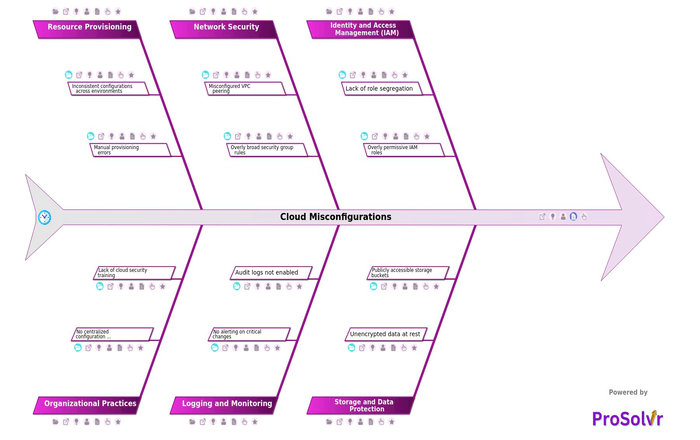
ProSolvr is an AI-powered visual root cause analysis application that helps teams investigate Cloud Misconfigurations through structured, GenAI-powered RCA aligned with Six Sigma principles. Using a visual fishbone diagram, organizations can examine identity and access management, network configuration, storage security, encryption, logging and monitoring, deployment practices, and organizational oversight in one clear view. This approach helps uncover deeper causes such as inadequate cloud security training, missing configuration baselines, lack of infrastructure-as-code reviews, weak access governance, and lack of secure cloud deployment policies. By moving beyond surface-level fixes, ProSolvr supports stronger Corrective and Preventive Action planning and helps prevent similar cloud misconfigurations from recurring.

Cloud Misconfigurations

    • Identity and Access Management (IAM)
      • Lack of role segregation
        • Same role used for multiple services
      • Overly permissive IAM roles
        • Use of wildcard (*) in permissions
    • Storage and Data Protection
      • Unencrypted data at rest
        • Encryption settings disabled by default
      • Publicly accessible storage buckets
        • No access control policy applied
    • Network Security
      • Misconfigured VPC peering
        • No traffic restrictions between VPCs
      • Overly broad security group rules
        • Open ports to 0.0.0.0/0
    • Logging and Monitoring
      • No alerting on critical changes
        • Changes go undetected
      • Audit logs not enabled
        • No record of user activities
    • Resource Provisioning
      • Inconsistent configurations across environments
        • No automated deployment templates
      • Manual provisioning errors
        • Incorrect default settings applied
    • Organizational Practices
      • No centralized configuration management
        • Each team manages settings independently
      • Lack of cloud security training
        • Teams unaware of shared responsibility model

Suggested Actions Checklist

Here are some corrective actions, preventive actions and investigative actions that organizations may find useful:

    • Identity and Access Management (IAM)
      • Lack of role segregation
        • Corrective Actions:
          • Reconfigure roles based on the principle of least privilege and create separate roles for distinct functions.
        • Preventive Actions:
          • Implement IAM policies that enforce role-based access control (RBAC) with periodic audits.
        • Investigative Actions:
          • Review IAM role usage logs to identify roles being used for multiple purposes and assess associated risks.
      • Overly permissive IAM roles
        • Corrective Actions:
          • Restrict permissions in IAM roles to only what is necessary for their intended function.
        • Preventive Actions:
          • Set up automated policy validation tools that detect overly broad permissions during role creation.
        • Investigative Actions:
          • Conduct a permissions audit to determine where and how excessive privileges have been granted.
    • Storage and Data Protection
      • Unencrypted data at rest
        • Corrective Actions:
          • Enable encryption for all existing unencrypted data and apply encryption policies to relevant storage services.
        • Preventive Actions:
          • Enforce mandatory encryption settings in all storage service configurations.
        • Investigative Actions:
          • Identify all storage resources currently holding unencrypted data and assess data sensitivity.
      • Publicly accessible storage buckets
        • Corrective Actions:
          • Revoke public access on all storage buckets that do not explicitly require it.
        • Preventive Actions:
          • Configure policies that deny public access by default unless explicitly approved through change management.
        • Investigative Actions:
          • Review access logs to detect if unauthorized users accessed publicly exposed data.
    • Network Security
      • Misconfigured VPC peering
        • Corrective Actions:
          • Reconfigure VPC peering settings to allow only required and secure traffic routes.
        • Preventive Actions:
          • Implement validation checks during VPC peering setup to ensure proper configuration.
        • Investigative Actions:
          • Audit current VPC peering arrangements to find unintended access paths or exposure.
      • Overly broad security group rules
        • Corrective Actions:
          • Tighten security group rules to limit access to specific IP addresses and ports.
        • Preventive Actions:
          • Define baseline security group templates with restricted rules that are reused across deployments.
        • Investigative Actions:
          • Analyze firewall and access logs to identify traffic allowed due to broad rules.
    • Logging and Monitoring
      • No alerting on critical changes
        • Corrective Actions:
          • Set up alerting mechanisms for key infrastructure and permission changes.
        • Preventive Actions:
          • Use configuration management policies that require alert rules to be included with all deployments.
        • Investigative Actions:
          • Review recent infrastructure changes to determine if any went unnoticed due to lack of alerting.
      • Audit logs not enabled
        • Corrective Actions:
          • Enable audit logging on all cloud services and ensure logs are stored securely.
        • Preventive Actions:
          • Include audit logging in the mandatory setup checklist for all new services.
        • Investigative Actions:
          • Evaluate which services operated without audit logs and identify gaps in accountability.
    • Resource Provisioning
      • Inconsistent configurations across environments
        • Corrective Actions:
          • Standardize configuration baselines and apply them uniformly across all environments.
        • Preventive Actions:
          • Use infrastructure as code (IaC) to enforce configuration consistency.
        • Investigative Actions:
          • Compare configurations across development, staging, and production to pinpoint inconsistencies.
      • Manual provisioning errors
        • Corrective Actions:
          • Roll back erroneous deployments and re-provision using validated configurations.
        • Preventive Actions:
          • Automate provisioning processes with tested deployment scripts or templates.
        • Investigative Actions:
          • Review manual change logs to trace how and when errors occurred.
    • Organizational Practices
      • No centralized configuration management
        • Corrective Actions:
          • Implement a centralized configuration management tool to enforce uniform policies.
        • Preventive Actions:
          • Make centralized management mandatory for all teams and enforce with administrative controls.
        • Investigative Actions:
          • Identify areas or services managed outside central control and evaluate related misconfigurations.
      • Lack of cloud security training
        • Corrective Actions:
          • Conduct targeted training sessions for teams responsible for cloud infrastructure.
        • Preventive Actions:
          • Establish a regular training and certification program on cloud security best practices.
        • Investigative Actions:
          • Survey team members to assess awareness and understanding of critical cloud security concepts.
 

Who can learn from the Cloud Misconfigurations template?

  • Cloud Architects: Cloud architects can use the template to understand potential misconfiguration categories that must be addressed during infrastructure design. It helps them align cloud architecture with security best practices from the outset.
  • DevOps Engineers: DevOps engineers benefit by identifying common configuration pitfalls across deployment pipelines. The template guides them in incorporating secure defaults and automated checks into CI/CD workflows.
  • Security Analysts: Security analysts can use the structure to anticipate likely vulnerabilities in cloud environments. It enhances their ability to conduct post-incident reviews and prepare targeted security audits.
  • IT Compliance Officers: Compliance officers can use the framework to map cloud configuration risks to regulatory requirements. It helps them establish policies and controls to ensure governance and accountability.
  • System Administrators: System administrators learn where their operational practices might introduce security gaps. The template acts as a checklist to verify and maintain secure system configurations.
  • Cybersecurity Trainers and Educators: Trainers can use the template as an educational tool to introduce learners to broad risk categories in cloud security. It provides a visual foundation for discussing preventive strategies and industry scenarios.

Why use this template?

ProSolvr is an AI-powered visual root cause analysis application that helps teams investigate Cloud Misconfigurations using structured fishbone diagrams and GenAI-powered RCA. In the post-incident phase, ProSolvr allows security, DevOps, cloud operations, and compliance teams to visualize the hierarchy of failure points, making it easier to communicate findings and drive consensus on action plans.

By organizing causes such as overly permissive IAM roles, public storage buckets, open ports, disabled logging, exposed secrets, unencrypted data, and weak deployment practices into a clear fishbone diagram, teams can trace the logical pathway from root causes to incident outcomes. This structured visualization supports faster remediation, stronger Corrective and Preventive Action planning, and continuous improvement in cloud security practices.

Use ProSolvr by smartQED to identify, analyze, and resolve cybersecurity issues in your organization with structured, AI-powered root cause analysis.

Curated from community experience and public sources:

  • https://www.upguard.com/blog/cloud-misconfiguration
  • https://cloudsecurityalliance.org/blog/2023/08/14/managing-cloud-misconfigurations-risks
